

Editions
KoNiMa Claude Sync is a single extension for every edition: the license decides which features are active. You can change edition, or move from a trial to a full license, without reinstalling anything.
What each edition unlocks
| What it unlocks | Starter | Pro | Team |
|---|---|---|---|
| Configuration sync (rules, skills, commands, agents) | ✅ | ✅ | ✅ |
| Plugin sync | ✅ | ✅ | ✅ |
| MCP server sync | ❌ | ✅ | ✅ |
Memory sync (claude-mem + project .md files) | ❌ | ✅ | ✅ |
| Sync every time a Claude Code session starts and ends, even with VS Code closed | ❌ | ✅ | ✅ |
| Custom hook sync | ❌ | ✅ | ✅ |
| Custom plugin sync (plugins the team writes itself) | ❌ | ✅ | ✅ |
| Two-repository governance, CORE + MEMORIES | ❌ | ❌ | ✅ |
| Managed seats + invitation codes | ❌ | ❌ | ✅ |
| Member proposals to the maintainer | ❌ | ❌ | ✅ |
| Audit log | ❌ | ❌ | ✅ |
Configuration and plugins are included in every edition. Pro adds MCP servers, memories and hooks. Team adds shared governance: two repositories, managed seats, invitations, proposals and audit. Custom plugins, the plugins your team writes itself, are included in Pro and Team: see the Custom plugins guide. For the details of what travels in each domain see What it syncs.
You can upgrade at any time
You’re not tied to the edition you started with: move to a higher edition whenever you like, without reinstalling and without losing anything. As soon as the new license is active, the additional modules unlock right away, and the new tabs and sync domains appear in the dashboard. The same applies when you move from a trial to a full license.
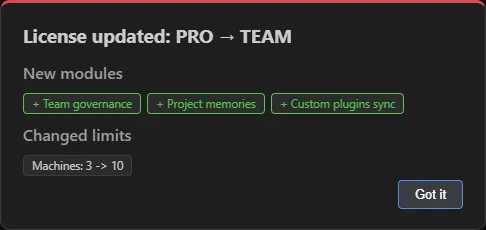 After a license upgrade, the extension lists the modules that were just unlocked.
Which edition to choose
- Starter: configuration and plugins, always the same and saved in your repository.
- Pro: several personal machines, with memories, MCP servers and hooks. For anyone who works between desktop and laptop and wants to find what Claude has learned everywhere.
- Team: several people with a shared company configuration, with roles, invitations, managed seats, audit and members’ proposals to the maintainer.
Machine limit
Each edition allows a certain number of machines (the seats). The limit is set by your license
and is always visible in the dashboard: on the Machines card of the Overview, in the form
used/maximum, and under Seats in User settings.
You can free seats at any time by deactivating a machine from the Machines tab: it is always an explicit choice, never automatic.
Team edition: two repositories
With the Team edition, setup asks for two repositories:
- CORE repository — governed configuration: the team’s shared configuration (rules, skills, commands, agents), which maintainers change and members receive;
- MEMORIES repository — team memories: project memories and the machine registry, which everyone contributes to.
Roles and permissions
The role is not configured in the app: it depends on your account’s permissions on the CORE repository.
- Maintainer: can write to CORE; looks after the shared configuration and plugins, decides on proposals, generates invitations, maintains the repositories, deactivates machines and merges projects.
- Member: reads CORE and writes to the MEMORIES repository; receives the configuration, contributes to memories and proposes changes to the maintainer.
Seats and invitation codes
In the Team edition, new members join through an invitation code (KNMI-…) generated by a
maintainer: in a single step it activates the team license and connects the repositories with the
new member’s credentials. Each code works only once and expires after 72 hours.
Effects on the dashboard
The dashboard shows only what your edition includes: tabs that aren’t available don’t appear.
- without the Plugins module, the Plugins tab is missing;
- without Memories, the Memory and Projects tabs are missing;
- without Audit, the Audit tab is missing;
- with the Session sync module, the Sessions tab appears;
- with the Team module, the Team tab appears (with the Proposals panel), the Machines, Projects, Plugins and Memory tabs become “Team” tabs, and setup asks for the two repositories.
Related pages
- What it syncs: the domains and what travels in each.
- Status bar and commands: statuses and Command Palette commands.
- First launch and setup: activating the license and connecting the repository.