

The Claude Code folder
The Claude folder is the folder where Claude Code keeps its configuration: rules, skills,
commands, agents, CLAUDE.md and settings.json. It is exactly what KoNiMa Claude Sync reads from
this machine and writes back when something arrives from your other machines. By default it is
~/.claude, in your user folder.
In the vast majority of cases you don’t need to do anything: Claude Sync finds it on its own. This page explains what happens when the folder is somewhere else, when it is missing, or when you have more than one.
My folder is in a non-standard place: how does it find it?
Claude Sync decides which folder to use by following a set order, and stops at the first one it finds:
- the VS Code setting
claudeSync.claudeHome, if you filled it in by hand; - the
CLAUDE_CONFIG_DIRenvironment variable (the one Claude Code itself uses to change folder), which is detected automatically; - the default value,
~/.claude.
If you keep your configuration in a non-standard place, you have normally already set
CLAUDE_CONFIG_DIR to make Claude Code itself work: in that case detection is automatic and there is
nothing to configure in Claude Sync.
The claudeSync.claudeHome setting applies to this machine only and never travels: it is a local
choice, not part of the shared configuration. A relative path in the setting is ignored, and
automatic detection takes over.
Does Claude Sync ask me which folder to use?
Only when it can’t choose on its own. If this machine has more than one Claude Code folder (for example a personal one in ~/.claude and a work one reached through
CLAUDE_CONFIG_DIR), Claude Sync asks you which one to sync instead of guessing and attaching the
repository to the wrong one. See I have more than one Claude folder
below for when and how this happens.
In every normal case, with a single folder or one you’ve already chosen, it goes ahead on its own without asking.
You can still choose the folder by hand at any time: with the Choose folder… button on the Claude folder row of the System check (System tab), or with Change next to the path at the top of the Claude system tab. The folder you choose must contain a Claude Code configuration. If you pick the wrong one, Claude Sync refuses it and tells you: “That folder does not look like a Claude Code folder — it has no settings.json, CLAUDE.md, skills or agents. Nothing was changed.”
If the folder is valid, the change is immediate: “Claude folder updated to …. Claude Sync restarted with the new folder.” You don’t need to reload the editor. If you cancel, nothing changes.
What if the folder is wrong or missing?
When the folder is missing, empty or probably not the right one, Claude Sync tells you right away:
- the status bar turns yellow with the warning icon and is never green;
- every tab of the dashboard shows the Claude folder not found banner, with the path where the app is looking;
- the status summary shows the Check setup pill.
The Claude folder row of the System check explains which situation you’re in:
| Situation | What the System check tells you |
|---|---|
| The folder doesn’t exist | The folder was not found at that path: there is nothing to sync. |
| Claude Code uses another folder | Claude Code is set up on this machine, but not in this folder. |
| The folder is empty but the repository isn’t | There is no Claude Code configuration here, while the repository has one: Claude Sync is reading the wrong folder. |
| New machine | There is no Claude Code configuration here yet: the first sync will create it. |
Claude Sync never creates the folder by itself, with one exception: a new machine where Claude Code has never run, where the first sync creates it as expected.
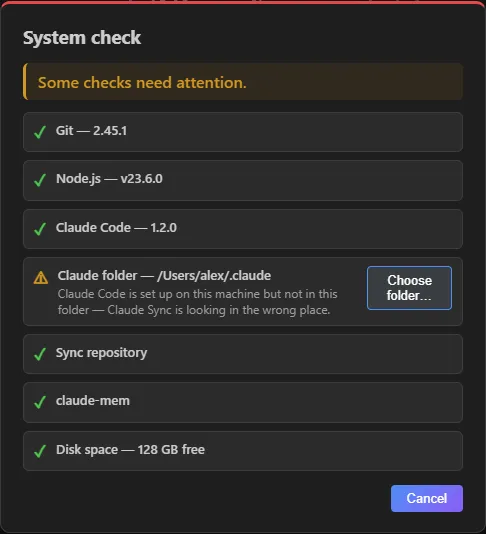 The System check, with the Claude folder row flagged and the button to choose the right one.
I have more than one Claude folder
Some machines have two Claude Code installations side by side: a personal one in ~/.claude
and a work one reached through CLAUDE_CONFIG_DIR, or a second ~/.claude-work next to the default
one. When Claude Sync finds two or more folders that contain a Claude Code configuration and
you haven’t chosen one yet, it asks you which one to sync instead of guessing: the chosen folder is
the one your repository is attached to, and a wrong choice would tie syncing to the wrong profile.
- During the first setup (before a repository is connected) this question comes first: Claude Sync lists the folders it found, each with where it found it, and you confirm with Use this folder (or Browse another folder…). Setup waits for your choice.
- On a machine that is already syncing it doesn’t interrupt your work: it offers the same choice once per VS Code session, showing the folder you’re syncing, until you decide. You can click Keep the current folder or switch to another one.
The choice is remembered for this machine, so you won’t be asked again. If only one folder contains real configuration, there is nothing to ask: Claude Sync uses it and follows the order described above, without any question.
What always stays in your home folder
Two things follow your user folder and do not move along with the configuration folder:
~/.claude.jsonalways stays in your home folder: Claude Code doesn’t move it underCLAUDE_CONFIG_DIR. Claude Sync doesn’t sync it, apart from the MCP server definitions it contains.- The claude-mem memory database also follows your home folder, not the configuration folder.
Inside the Claude folder, Claude Sync keeps some working files and local backups. They stay on this machine and are not synced.
Several windows or sessions at once
If you open several VS Code windows or several Claude Code sessions on the same folder, you’re safe: they take turns, so your changes are neither lost nor duplicated. One window drives the automatic sync; the others follow it. If you start a manual sync while another one is running, you’ll see “Another window is syncing right now — try again shortly.”
Different Claude folders, on the other hand, sync completely independently of each other.
See also
- Troubleshooting: what to do when Check setup appears.
- Status bar and commands: the status bar states, including folder not found.
- What it syncs: the domains and what travels in each.