

Sessions across machines
Today you work on a project from your desktop, tomorrow you pick it up on your laptop, and you’d like
to continue the conversation with Claude exactly where you left it. That is what session sync is for:
a Claude Code session you choose travels to your other machines, where you resume it with
claude -r.
You decide which sessions travel
No session leaves the machine unless you ask. To take one with you:
- During the Claude Code session, type the
/sync-sessioncommand. - Claude confirms with a sentence that the session will be taken to your other machines when it ends.
- End the session as usual. When it ends, the conversation is encrypted and sent to your sync repository.
- On the other machine, after the sync, open the project and resume the session with
claude -r.
Only the command counts. If you write a sentence like “what is /sync-session for?”, the session is not marked.
Your sessions stay yours
The sessions you take with you are visible only to you, on your machines. No teammate sees them, not even the maintainer, and they travel encrypted.
A session taken with /sync-session stays in the repository for 14 days, then it is removed on
its own; the Sessions tab tells you when that happens. You can change how long with the
claudeSync.sessionsCarryExpiryDays setting.
The Sessions tab
The Sessions tab of the dashboard lists your synced sessions, grouped by machine and then by project. Each row shows a short identifier, the first line of the conversation and the date.
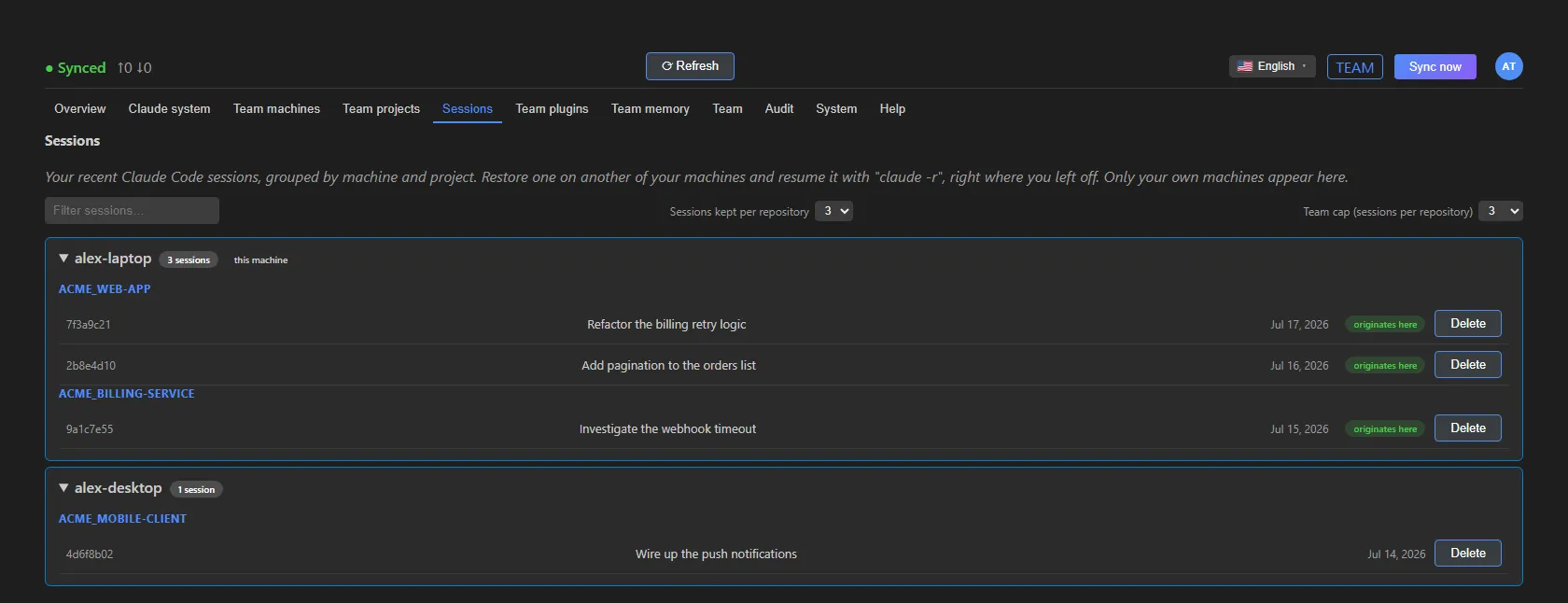 The Sessions tab (sample data, maintainer’s view).
- Filter sessions… searches by title, identifier, project or machine.
- Sessions kept per repository sets how many recent sessions to keep for each project. You can only set it lower than the team limit.
- Team cap (sessions per repository), visible to the maintainer, sets the maximum for the whole team. Every machine inherits it; a member can keep fewer, never more.
- originates here marks the sessions that started on this machine.
- not here yet flags a session that hasn’t been placed on this machine yet. The tooltip explains why: usually it’s enough to open the project once in Claude Code on this machine, and the session arrives at the next sync.
- Delete removes the session from the repository and from all your machines at the next sync. It can’t be undone and asks for confirmation.
If a session was resumed and continued on two machines, Claude Sync keeps both versions: neither one overwrites the other.
Turning it on or off
To turn session sync on or off on this machine:
- In VS Code, open File › Preferences › Settings and search for Claude Sync.
- Turn Sync Sessions on or off.
The change applies right away. When you turn it off, no session travels in either direction and the list of sessions you had marked is cleared: when you turn it back on, only what you mark again goes out.
See also
- What it syncs: all the sync domains.
- Privacy and security: how your data is protected.